
The 2025.3 release strengthens security and makes it easier to manage user accounts for eModules, Webstore and WebView. We’ve also introduced new validation checks and cost adjustment settings that help you avoid errors and save time.
We’ve also resolved issues identified in previous releases.
New payday filing validation (NZ)
On 4 October 2025, Inland Revenue added five new validation checks to its payday filing upload service.
To help you identify these errors before you upload your file, you now get warned about errors when saving a pay, processing a pay or processing the payday file.
For more information about the new validation, see Inland Revenue validation changes — MYOB Greentree (October 2025).
Web session management for eModules, Webstore and WebView,
We’ve enhanced security and made it easier for administrations to manage user sessions.
Seeing who’s logged in and choosing to end a user’s session
An administrator can now see who is logged in to eModules, Webstore and WebView by checking the Users Logged In form (go to Help > About). If needed, the administrator can force a user off by selecting them and clicking Remove Users.
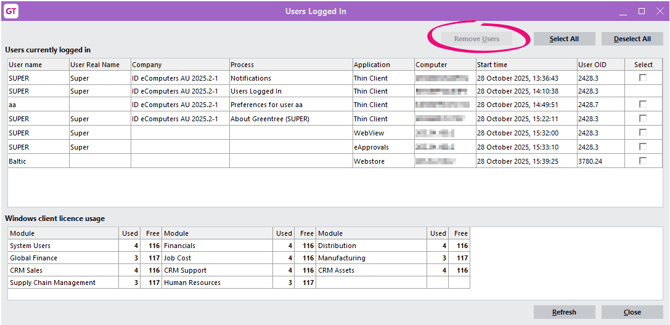
For an administrator to be able to see and remove logged in users, they need to have two checkboxes selected on the Preferences for user form: View users and Can remove users.
To change user preferences, go to System > System Setup > User Maintenance.
Preventing users from logging in at different locations with one set of credentials
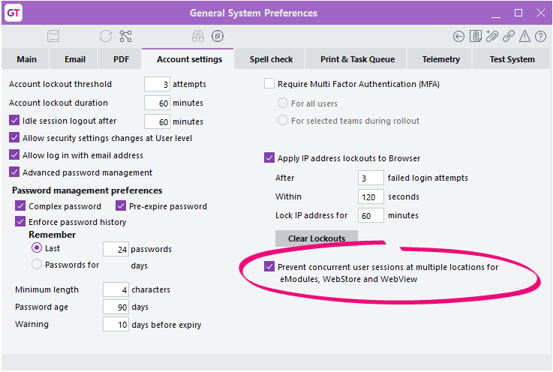
For better security against hacking, we’ve added a new setting: Prevent concurrent user sessions at multiple locations for eModules, WebStore and WebView. If someone hacks your credentials, this setting means you’ll know sooner – like when you next log on or if you change your password. And when you let your administrator know, they can safeguard your account sooner.
The new setting is enabled by default when you upgrade to 2025.3. Although we recommend you leave it enabled for better security, you can disable it on the Account Settings tab of the General System Preferences form.
When you try logging in after someone else has already logged in with the same credentials at a different IP address, you get a warning that the other user will be logged out.
The setting:
-
Is only available for sites that run eModules, Webstore or WebView, and it applies only to these applications.
-
Does not prevent multiple sessions with the same credentials at the same location. For example, a Greentree user can run multiple copies of the Windows client, eApprovals and eRequisitions on the same machine.
-
Does not affect the visibility of sessions or what happens when passwords are changed or access is removed.
If your company currently shares credentials, you might need to notify your users and external parties about the change (e.g. Webstore customers and WebView customers, salespeople and suppliers).
Idle session logout
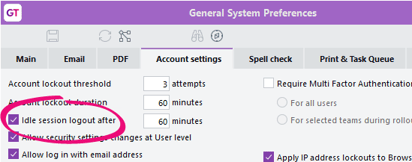
The Idle session logout setting on the Account Settings tab of the General System Preferences form now applies to eModules, Webstore and WebView. For eModules, sessions are still subject to an existing IIS ASP session time-out setting – whichever is shorter will occur first.
Basing total cost adjustment on master level
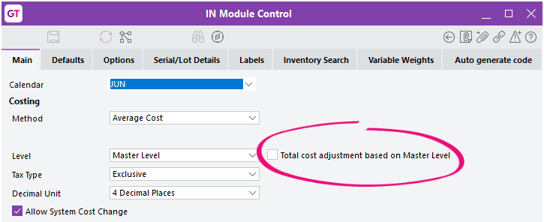
To resolve an issue with total cost adjustments (ID: 00013100), we’ve added a new setting to the Main tab of the IN Module Control form: Total cost adjustment based on Master Level.
If you enable this setting, Greentree creates cost adjustments based only on the Master Level quantity on hand, instead of creating them based on individual locations.
This setting is only available when Costing Level is set to Master Level and Costing Method is set to Average Cost. By default, it’s not enabled.
eDocs – Select job manager as an approver for an eDoc header
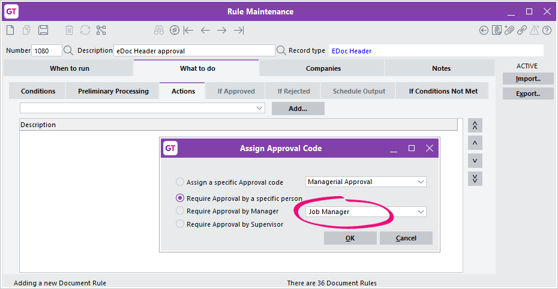
To save you the hassle of doing separate rules for every job manager, you can now select Job Manager when assigning an approval code for an eDoc header. You can create an approval rule by going to Workflow > Approvals and Alerts > Rule Maintenance
Interval scheduling options for system scripts
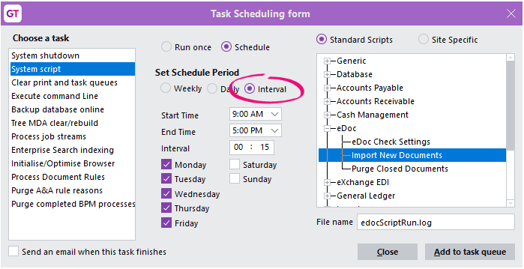
You can now schedule system scripts to run at intervals, so you don’t have to add dozens of schedules to keep your processes running regularly. For example, you can schedule a task to run every fifteen minutes between 9am and 5pm on Mondays and Fridays. Previously, this was only available for Approvals and Alerts rules.
Plus, you can now schedule all tasks from either the Process menu or the Workflow > Approvals and Alerts menu.
On the Task Scheduling form, select Interval as the schedule period, then choose what times you want the task to run.
Recording when user accounts were created and modified
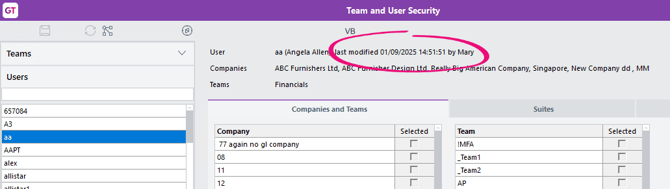
To help administrators keep track of user accounts, MYOB Greentree now records when a user account was created and last modified, as well as who made the changes.
You can see these details on the Team and User Security form when viewing a team or user.
The corresponding new attributes on the User class (entryUser, entryTimeStamp, modifiedUser and modifiedTimeStamp) can be reported via Jade Query and Query Designer, and examined using Inspector.
Changes to super user restrictions
In the 2025.2 release, we made some settings accessible to more user types, so that fewer people would require super access.
In this release, we’ve removed the super-only restriction for the Drill down is read only setting on the User Preferences screen. Now, any authorised user can select or deselect this setting.
Preventing test system patches from being applied to production systems
We’ve changed how the Is a test system setting works on the Test System tab of the General System Preference screen.
Now, when you select the setting, you get a warning that you can’t undo the change from a production system to a test system.
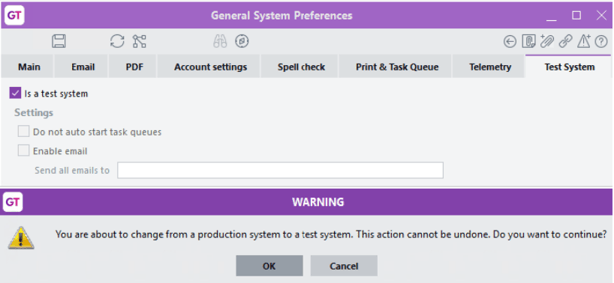
Selecting OK for the warning makes the setting read-only. If you apply package 2025.3.0 to a system that already has Is a test system selected, this setting will be read only and can’t be changed.
The same restriction will apply to the INI file setting [JadeServer] IsATestSystem. This lets you change a system from production to test, but not from test to production.
Want to change a system back from test to production? You need to contact support for a debug package.
Other improvements
-
We’ve improved the performance of PDF generation when previewing a report. We’ve also fixed an issue where a PDF could open twice.
-
We’ve improved performance when importing pays.
-
Three new FREE functions let you automatically assign a batch number to an AP invoice, credit not or payment: gtAPInvoiceAutoBatch, gtAPCreditNoteAutoBatch and gtAPPaymentAutoBatch. These are completely new functions that won’t break existing spreadsheets, templates etc.
Resolved issues
Greentree Desktop
|
Issue IDs |
Description |
|---|---|
|
00014313 |
An error could occur when users tried to set a bin as not mixed even though multiple stock items were allocated: “Bin is already used by another inventory item.” This issue has been resolved by preventing the "isMixed" option from being deselected when multiple stock items are present, and by enhancing error messages to clearly indicate which stock item is causing the problem. |
|
N/A |
On the PO Purchase Order report, the text “** not initialised **” could appear at the top of the report. |
|
N/A |
When saving a stocktake template, an error could occur if there is a prepare stocktake with the same name and if you selected a tree: “An error has occurred (1310) Key already used in this dictionary.” We’ve changed the wording of the error to make it more useful: “A Stocktake Template with the same name and tree already exists. Please provide a unique name for this Stocktake.” |
|
N/A |
For New Zealand companies, if the Inland Revenue configuration was incomplete, opening the Create Lodgement form caused an unhandled exception error. This prevented you from creating a lodgement file. Greentree now checks that the required configuration is complete. If it’s not, you get an error that explains the problem: “Cannot proceed as the EI Interfaces have not been set up on the 'Inland Revenue Reporting Configuration' form.” Also, to prevent misconfiguration, you can no longer change the HR country when payroll payments have been made in the company. |
|
00014105 |
If you changed locations or stock items on a PO line, two issues could occur:
Both issues have been resolved. |
|
00014398 |
When Check for null references was selected on the CRM Object Reference Check form, two errors could occur when running a check:
|
|
00014339 |
When an employee’s pay had a JC leave transaction type, the pay date wasn’t appearing in the HR Balance Transaction Listing report. |
|
00014248 |
When revising a CRM quote, item prices would update even if CRM was set to hold prices on revisions. |
|
00014258 |
If a user didn’t have access to job maintenance, but they did have jobs on their workflow desktop, they were able to drill down to the job and change it. Now, if a user has enquiry-only access to the job cost module, they can view but not edit a job when they drill down from a workflow desktop. We’ve also removed access to Job Costing preference settings for users without access to the job cost module. |
|
00014230 |
When creating plant charges for a job, the sell rate could be blank after saving the header and selecting the plant. |
|
00014130 |
When copying a user’s preferences to a new user, you could get an error about exceeding your number of user licences. To prevent the issue, preferences are no longer copied to de‑registered modules. |
|
00014399 |
When running CRM Object Reference Check, an error could occur: “An error has occurred (1318) Dynamic dictionary definition incomplete.” |
|
N/A |
We’ve fixed a spelling mistake on the Balances tab of the Transaction Type – Pay screen. The Pecentage is now correctly labelled as Percentage. |
eModules
|
Issue IDs |
Description |
|---|---|
|
00014966 |
Attachments with a # character in the file name failed to open from the browser and could download as an empty file. |
|
00014226 |
If you selected an item on an eDoc on either the Recently Used or Stock tabs, you couldn’t deselect it. |
|
00014436 |
For eRequisitions, uploading attachments was slow. |
|
00014242 |
Intercompany eDocs could still be displayed on a Workflow desktop even after being approved. |