
Australian payroll compliance updates
Qualifying earnings for ETPs
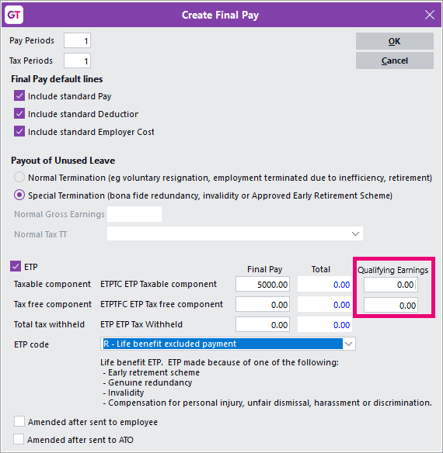
You can now enter the qualifying earnings (QE) amount for taxable and tax-free employment termination payment (ETP) components, either when creating a final pay or when entering a HR journal. This ensures your QE reporting is correct, even when an ETP is entered outside of a final pay.
- On the Create Final Pay form, we've added Qualifying Earnings fields for the taxable and tax-free components of an ETP.
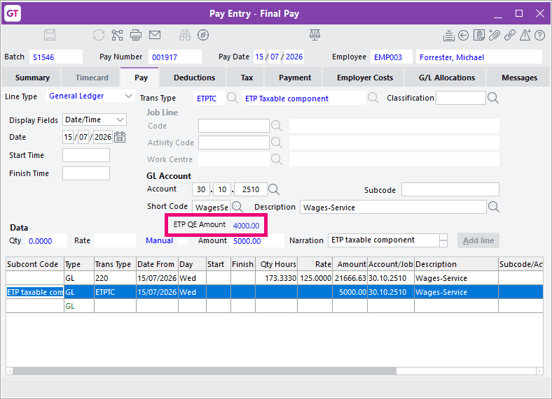
- On the Pay Entry - Final Pay form, the ETP QE Amount appears as read-only on the Pay tab when you select an ETP line.
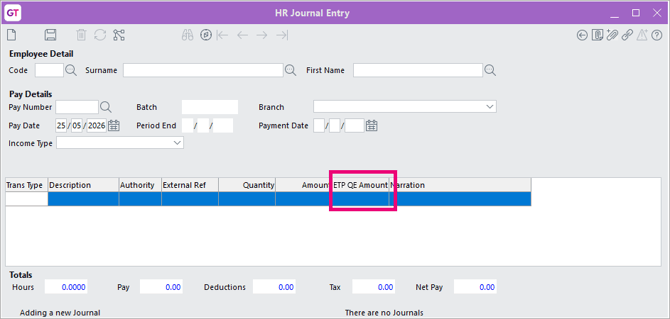
- On the HR Journal Entry form, we've added an ETP QE Amount column for relevant ETP transaction types.
- ETP QE amounts are included in employee year-to-date qualifying earnings, STP Q reporting and the HR Superannuation YTD Summary report.
Updated maximum super contribution base
From 1 July 2026, the maximum super contribution base is set to $270,830 annually. If you haven't manually added this threshold to the Payroll > Super tab of HR Module Control, it'll be automatically added after upgrading to 2026.2.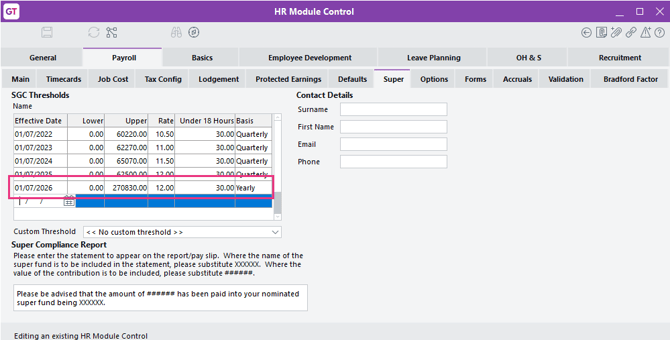
New features
Audit trail for account setting changes
You can use the new Events tab in General System Preferences > Account Settings to see who changed a setting, when it changed, and its previous and new values. This includes the Account lockout threshold and other settings on the tab.
You can search events by date and open each entry in a read-only view with more space for details. This makes it easier to investigate security setting changes without altering the audit record.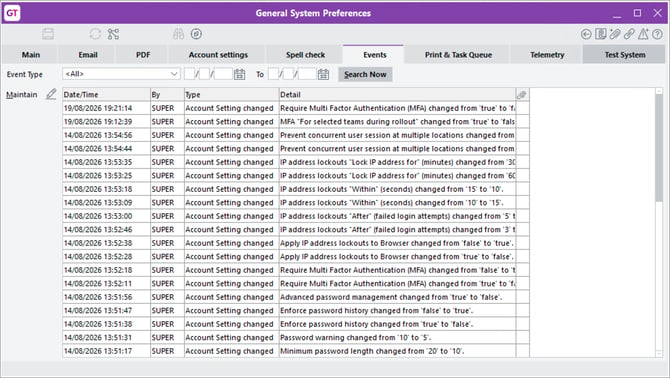
Improved password setup for WebView users
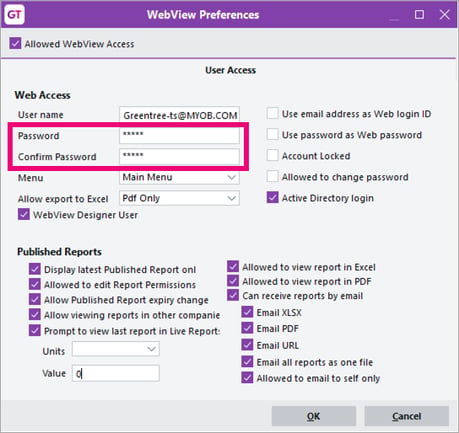
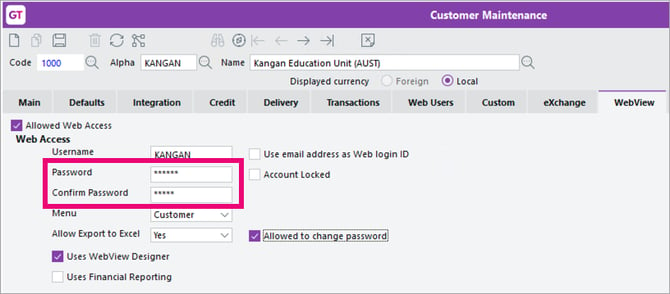
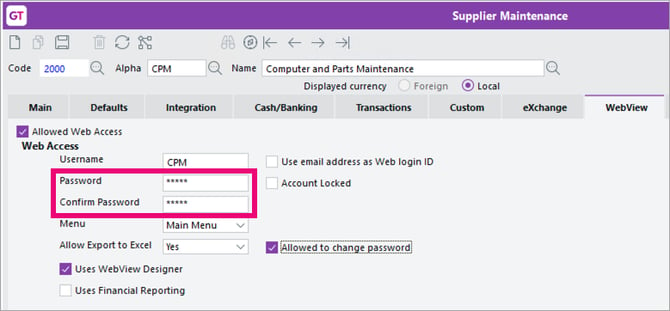
When setting or changing passwords for customers, suppliers or Greentree users with WebView access, you must now enter the password twice – once in the Password field and once in the new Confirm Password field. If the passwords don’t match, you’ll be prompted to correct them before saving, reducing password errors and sign-in issues.
We’ve also improved the settings layout for Greentree users, so Published Report options and checkbox labels are fully visible.
Here's how the changes look:
- On the WebView Preferences form.
- On the Customer Maintenance form, WebView tab.
- On the Supplier Maintenance form, WebView tab.
Jade 2025
The 2026.2.0 release of Greentree upgrades its Jade platform from Jade 2022 to Jade 2025, ensuring it's on a supported version.
The Jade platform will be updated as part of the Greentree package update process.
If you're an MYOB partner, see our Jade 2025 upgrade PDF for detailed instructions on doing the upgrade.
Resolved issues
Debug package available for printing issue
A Windows security update may cause issues when printing receipts, labels and tickets, or when opening POS cash drawers. Contact MYOB support for the debug package.
Greentree Desktop
| Issue ID | Description |
| N/A | Changes to system control and account settings weren’t captured in the audit history. This has been resolved. |
| 269276723676 | Bulk emails (e.g. payslips or customer statements) sent through Microsoft Graph or Exchange could fail after the first 20 messages because refreshed access tokens weren’t cached correctly. This has been resolved. |
| N/A | An issue prevented you from completing all outstanding purchase orders by selecting Select all. This has been resolved. |
| 264111277531 | Applying the Payday Super and KiwiSaver payroll update could overwrite the superannuation threshold setting. The update now uses the correct $270,830 threshold and preserves an existing 1 July setting, only adding a new record when one doesn’t already exist. |
| N/A | We've fixed the calculation of qualifying earnings for salary sacrifice deductions in STP reporting. Salary sacrifice amounts paid to superannuation or other employee benefits are now treated correctly, helping ensure accurate qualifying earnings and super calculations. |
| 260380533227 | Qualifying earnings for job costing lines was reported as $0 in STP files. STP files now include the pay amount for job costing lines when their transaction type is configured to be included in qualifying earnings. |
| 259723325901 | Error 1086 could occur when opening existing pays containing job costing lines after applying the Payday Super and ETP update. This has been resolved. |
| 257391527405 | All users were could change the Can Unassign Approval Codes setting in Workflow User Preferences. This has been resolved, so the setting is only available to administrators. |
| N/A | You could preview the HR Authority Remittance Export, but a CSV file wouldn't be created. This has been resolved. |
| N/A | On the IN Multiple Adjustment Entry form, the reload button was not refreshing transaction details after saving. This has been resolved. |
| N/A | On the IN Multiple Adjustment Entry form, saving a line without a transaction type could cause a recurring 1090 error. This has been resolved, so the error closes when you click OK. |
| 255668767187 | We have corrected spelling errors in Inventory forms, headings and menus, replacing "supercede" and "supercession" with "supersede" and "supersession". Obsolete references, including the old Inventory Supercession Audit Report, were also removed. |
| N/A | Reactivating a rejected requisition under single-level approvals could cause error 1090. This has been resolved, so requisitions can be corrected, reactivated and resubmitted for approval from Requisition Entry or eRequisitions |
| 262582417907 | When exporting a standard SAFF file, you could get an error if an employee’s phone number included an international or area code: "An error has occurred (4013) Result of expression overflows Integer precision." This has been resolved. |
WebView
| Issue IDs | Description |
| 262582489580 | Job Summary in WebView could display incorrect costs. We've prepared two custom views to calculate total costs and quantities from the underlying job-cost line items. If you experience the issue, contact support and they can enable these two views. |
eDocs
| Issue IDs | Description |
| N/A | You couldn't preview PDFs when Internet Explorer Display was disabled. This has been resolved. |
| 258281782758 | A user couldn't create AP invoices when another user was creating an invoice at the same time. We've improved messaging to keep users better informed about what's causing the block. |