
Updated Jade instructions The previous 2026.2 release upgraded MYOB Greentree to use the Jade 2025 platform. See our recently updated Jade 2025 upgrade PDF.
New features
Changing AP supplier calendars with a system script
You can now use the new AP Change Supplier Calendar system script to move supplier transactions and period summaries onto a different calendar, in the same way as the existing AR Change Customer Calendar script.
We've also standardised the AR Change Customer Calendar script so both scripts share common logic. Existing AR calendar changes continue to work as before.
Bank country for suppliers and customers
You can now set a bank country for suppliers and customers, so bank account validation uses the country of the supplier or customer rather than only the company country. This makes it easier to store and validate bank details for foreign suppliers and customers.
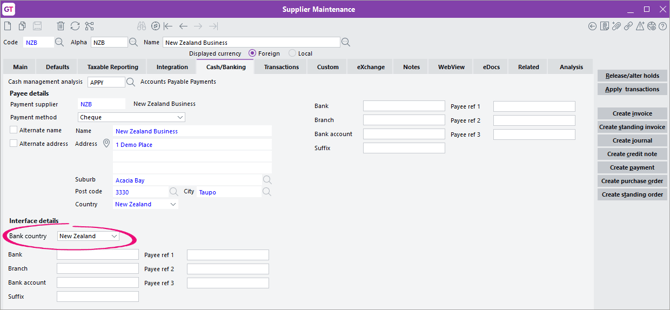
- On the Supplier Maintenance form, Cash/Banking tab, we've added a Bank country field. It defaults to the company country.
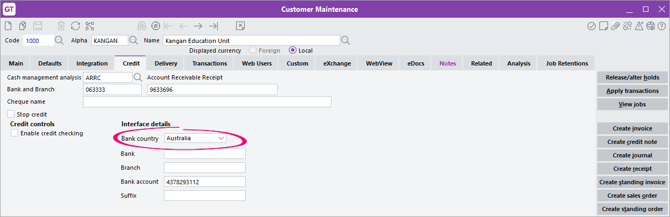
- On the Customer Maintenance form, Credit tab, we've added a Bank country field. It defaults to the company country.
- The Report Writer method Validate Direct Credit Details now uses bank country instead of company country.
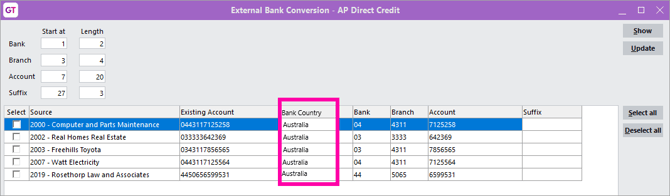
- We've updated the Convert Supplier Bank Details system script to use the bank country when validating bank accounts. You can also now select a supplier's Bank Country in the new column on the External Bank Conversion - AP Direct Credit screen.
Ignoring templates for mandatory job cost trees
When you make a job cost tree mandatory, you no longer need to allocate job cost templates to a branch. Jobs created from templates still need a valid branch in any mandatory job cost tree when the job is created.
CRM Service Request API – ExtraServicePersons
The CRM Service Request API now supports posting ExtraServicePersons on service requests.
Resolved issues
Greentree Desktop
| Issue ID | Description |
|---|---|
| N/A | A Windows security update could cause issues when printing receipts, labels and tickets, or when opening POS cash drawers (including error 15025). This release includes the Jade platform hotfix for that compatibility issue. |
| N/A | Microsoft Access ODBC queries that use string parameters could fail. This release includes the Jade ODBC hotfix so those connections work again. |
| 265508120056 | Intermittent email failures could occur with exception 14115: " Ole initialize failed error when attempting to initalize OLE/COM”. This has been resolved. |
| N/A | We've improved the performance of the HR Authority Remittance export and HR Batch Listing (including related pay detail/batch listing processing). |
| 278916476409 | On the Employee Maintenance form, Transactions > Balances tab, the the To date field was blank instead of defaulting to today's date, so entitled hours and not entitled hours weren't shown correctly. This has been resolved. |
| 278759601645 | When sending a user message, we've corrected the spelling of "workstaion" with "workstation". |
| 279278789108 | After exporting a report to Excel, the mouse cursor could keep showing the loading icon. This has been resolved. |
| 280043563472 | Creating a receipt from an unsaved PO shipment could cause error 1090. This has been resolved, so you can create a receipt without saving the shipment first. |
| 286422315493 | After fully receiving a PO shipment using Create Receipt, the Create Receipt button could remain enabled and the shipment status could be incorrect. This has been resolved. |
| 277879679473 | DIM AP invoice import could post an incorrect GL journal because the currency rate for the company base rate wasn't imported correctly. This has been resolved. |
| 287088403932 | On the Apply Unapplied Transactions screens, scrolling and sorting the applied transactions table could be inconsistent or clear the form, especially with large transaction sets. This has been resolved. |
Browser / WebView
| Issue ID | Description |
|---|---|
| 252413201900 | Leave request and Leave Planner screens could display incorrectly. This has been resolved. |
| 276648205786 | After upgrading to 2026.1, WebView login could fail on iOS (including being unable to enter a username). This has been resolved. |
| 278940245486 | On the JC Timesheet Entry, activity codes weren't filtered by both the employee and job activity code groups when you selected the job first on a new line. This has been resolved. |
eDocs
| Issue ID | Description |
|---|---|
| 272117529054 | When selecting lines in eDocs, quantity wasn't auto-populated on the Recently Used, Stock and Favourites tabs. This has been resolved. |
| 272351277511 | Automatically matching an eDoc AP invoice to a purchase order could use the original PO line quantity instead of the outstanding quantity. Matching now uses the outstanding quantity. |
CRM
| Issue ID | Description |
|---|---|
| 286880675282 | Using the FREE function gtCRMPhysicalAssetMaintCycleWeek to upload fortnightly maintenance cycles could cause a type mismatch on days. This has been resolved. |