
If an employee wants to contribute less than the minimum KiwiSaver amount when they get paid, they can request a rate reduction from Inland Revenue (IR). IR will let you know if an employee's rate reduction is approved. You'll then need to update the employee's pay.
In February, we made a debug package available that simplifies adding rate reductions. It's only available for version 2025.3.
If you're on an earlier version, you can still account for rate reductions, but it requires extra manual steps. There are different ways to manually account for rate reductions, but we recommend the way described in the If you didn't apply the debug package section.
If you applied the debug package
-
Go to HR > Employee Maintenance.
-
Click the Tax Config tab.
-
In the KiwiSaver: Savings Suspension / Rate Reduction table, add a new line with these settings:
-
Type – Select Rate Reduction.
-
Applies To – The Rate Reduction can apply to Employee Only Contributions or Employee and Employer Contributions
-
Rate % – On or after 01 April 2026 the system will set default a rate of 3%. This is taken from a setting on the HR Module Control > Payroll > Tax Config tab that holds the Default Rate for Rate Reductions.
-
Start Date – Enter the start date for the rate reduction. Savings Suspensions and rate reductions are not allowed to overlap. You cannot enter a rate reduction with a start date that is earlier than an existing savings suspension stop date.
-
Stop Date – Enter the stop date for the rate reduction. Once the stop date has been reached the system will use the deduction and employer cost rates for future KiwiSaver contributions.
-
- Save your changes.
When finalising a pay
If the actual payment date differs from the expected payment date (which is taken from the pay group at the time the pay is finalised), and this affects either a savings suspension or a rate reduction, you'll get a warning to review the KiwiSaver deductions and employer costs to ensure they're correct.
If you didn't apply the debug package
The following steps also apply for complying fund rate reductions.
Create transaction types for rate reductions
- Go to HR > System > Payroll > Transaction Type > Deductions.
- Create a new KiwiSaver deduction for 3%, with an effective date of 01/04/2026.
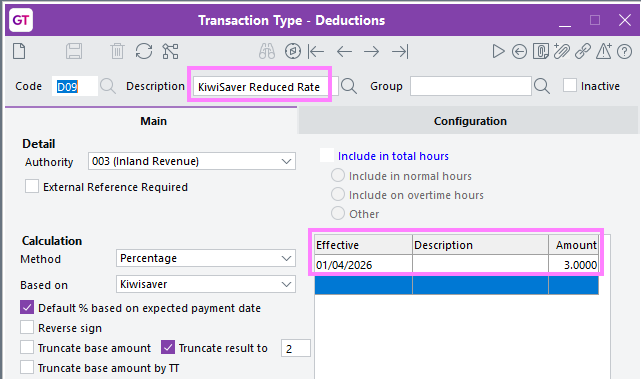
- Save your changes.
- Go to HR > System > Payroll > Transaction Type > Employer Costs.
- Create a new KiwiSaver employer cost for 3%, with an effective date of 01/04/2026.
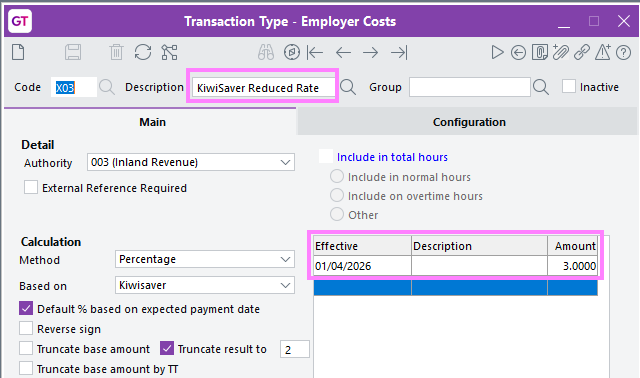
- Save your changes.
- Go to HR > System > Payroll > Inland Revenue Reporting Configuration.
- On the KiwiSaver Employee tab, add the new KiwiSaver deduction you created in step 2.
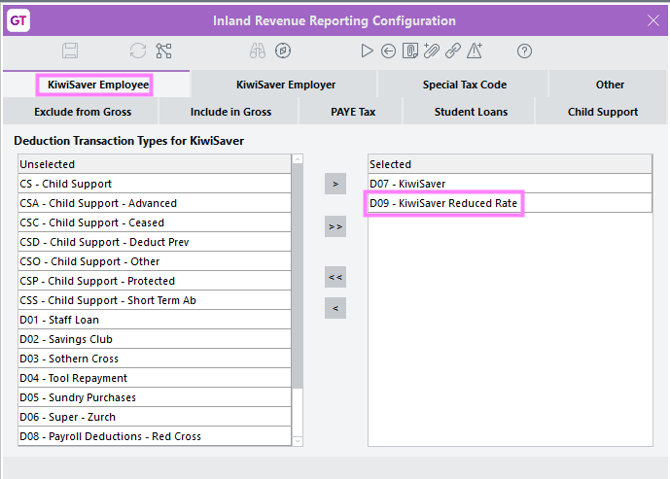
- On the KiwiSaver Employer tab, add the KiwiSaver employer cost you created in step 4.
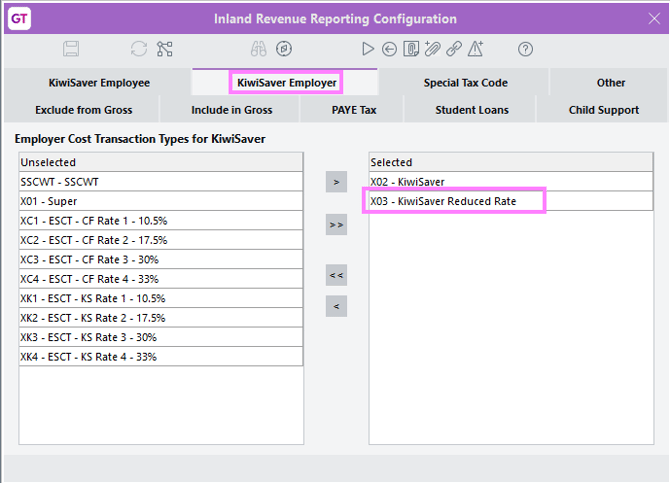
-
Save your changes.
Manually add the rate reduction to an employee's pay
- Go to HR > Payroll > Payroll Employee Maintenance.
- Open the record of the employee who has received the rate reduction.
- Click the Payroll tab, then the Deductions sub-tab.
- For the employee's existing KiwiSaver deduction, select the checkbox in the Inactive column.
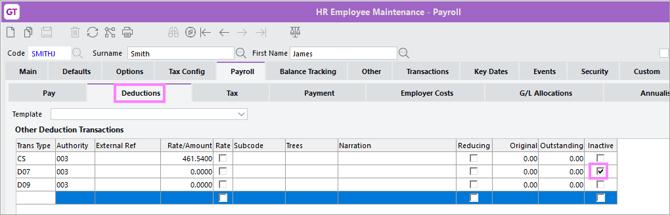
- Add the 3% KiwiSaver deduction you created for rate reductions.
-
If the employer cost is also reducing to 3%:
-
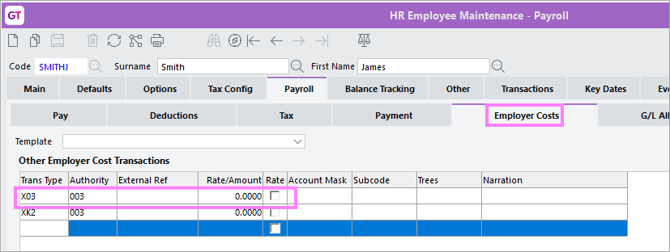
Remove the existing KiwiSaver employer cost line.
-
Add the 3% KiwiSaver employer cost you created for rate reductions.
-
-
Add any copies of documentation supporting the employee's rate reduction exemption as attachments to the employee's masterfile record.
Set up notifications for rate reduction expiry
Because a rate reduction is only temporary, we recommend setting up a notification for when an employee's exemption will expire and their deduction and employer cost will need to change. There are two ways you can do this:
-
Adding a Key Date record to those employees with a rate reduction. You'll need to regularly run the key date report.
-
Adding an instant alert to the employee record for the rate reduction expiry.