
As part of the 2024 New Zealand budget, new personal income tax thresholds apply from 31 July 2024. For extra payments, the new thresholds apply from 1 April 2025.
To stay compliant and apply the new thresholds to MYOB Greentree, you need to:
- Apply a debug package.
- Import the updated tax scales.
What’s changed
Income thresholds
|
Current Income Range |
Tax Rates |
New income range from 31 July 2024 (Extra payments from 01 April 2025) |
Tax Rates |
|
$0 - $14,000 |
10.5% |
$0 - $15,600 |
10.5% |
|
$14,001 - $48,000 |
17.5% |
$15,601 - $53,500 |
17.5% |
|
$48,001 - $70,000 |
30% |
$53,501 - $78,100 |
30% |
|
$70,001 - $180,000 |
33% |
$78,101 - $180,000 |
33% |
|
$180,001 and above |
39% |
$180,001 and above |
39% |
Independent Earner Tax Credit (IETC) thresholds
|
Threshold |
Current threshold |
New threshold 31 July 2024 |
|---|---|---|
|
Lower Threshold |
$24,000 |
$24,000 |
|
Upper Threshold |
$48,000 |
$70,000 |
|
Abatement starts |
$44,000 |
$66,000 |
Applying the new thresholds
1. Apply the debug package
Start by applying the debug package we’ve provided. This ensures that the new thresholds for extra payments won’t take effect until 01 April 2025.
You must be on version 2021.2.0 or later to apply the debug package.
2. Import the updated tax scales
You need to import tax scales separately for each company using payroll. You need to do this before 31 July 2024, when the new thresholds come into effect.
-
- Save the TaxScaleNewZealand_2024_07_31.csv file to your PC.
- Open Greentree Desktop and go to HR > System > Payroll > Import/Export > Tax Scales Import. The Import Tax Scales window opens.
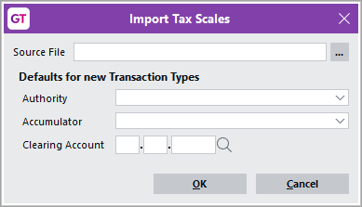
- In the Source File field, select the tax scales file that you saved to your workstation.
- For any new tax codes you need to set up, complete the following fields. Greentree creates the new tax codes:
- Authority – Select the authority you have set up for the IRD.
- Accumulator – Select the accumulator used to calculate tax.
This is normally called Taxable Income. If you’re updating an existing site, check the current tax transaction type. The accumulator to select here is the same one that is selected in the Based on field of the transaction type. - Clearing Account – If you are using the Greentree General Ledger module, enter the tax clearing account code.
- Click OK.
- In the Confirmation window, choose whether to update the transaction type descriptions:
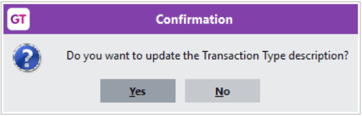
- Clicking Yes automatically updates the transaction type with the descriptions in the TaxScaleNewZealand_2024_07_31.csv file.
- Clicking No means you need to manually change the transaction type descriptions.