By comparing the values in different reports, you can reconcile sub-ledgers for accounts receivable (AR) and accounts payable (AP) with the general ledger (GL).
Key points
- Before getting started, if you use foreign currency, ensure you have updated the foreign exchange reporting rates for both sub-ledgers.
- If things are not balancing correctly, check our troubleshooting steps.
- Need more help? Reach out to your consultant and request a spreadsheet that simplifies the process, and gives you a document you can show to auditors.
Comparing reports for reconciliation
For both sub-ledgers, the steps are the same. The only difference is one of the reports you need. The screenshots below show examples for the Accounts Payable sub-ledger.
-
Print these reports:
- For Accounts Payable, print the Supplier Balances report (not Aged Balances) – Select the Include Hold Value in Total checkbox and, if using Foreign Currency, choose to group by Currency.
- For Accounts Receivable, print the Customer Balances report. If you use holds in AR, select Include Hold Value in Total.
-
If using foreign currency, print the Unrealised Gain/Loss for the period end.
-
Transaction Listing – For dates that cover the same period.
-
Audit Trail – For dates that cover the same period.
- In the Supplier Balances and Customer Balances reports, review the Total Balances.
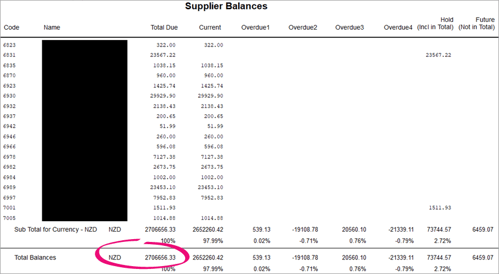
- If using foreign currency, in the Unrealised Gain/Loss report, add or subtract the Grand Total Gain or Loss calculated.
- In the Transaction Listing report, make sure that the Grand Total matches the total of the supplier balances, plus or minus the unrealised gain or loss. (Not the total in the Outstanding column, which does not include any held values).
There might be discrepancies between reports because of rounding on conversions from foreign to local currencies, but these should be minor.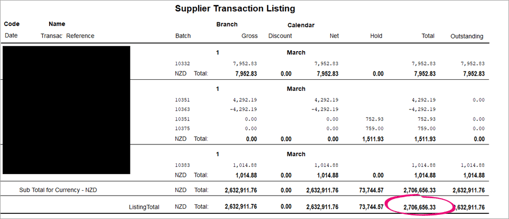
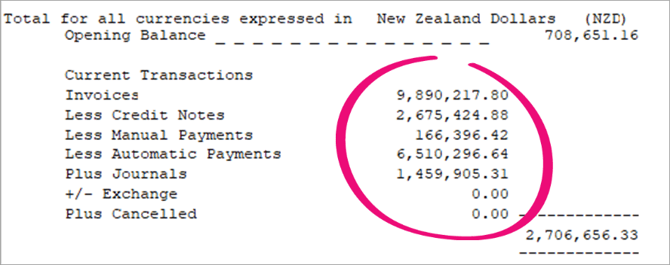
- In the Audit Trail report, the Local Currency Summary should show the same value.
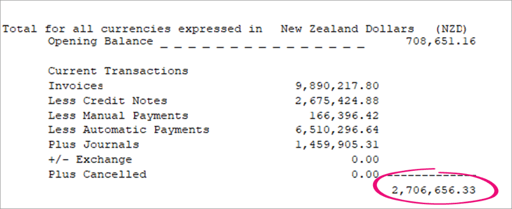
- Once these reports balance, you can balance the AP or AR subsidiary ledger with the general ledger creditors control accounts.
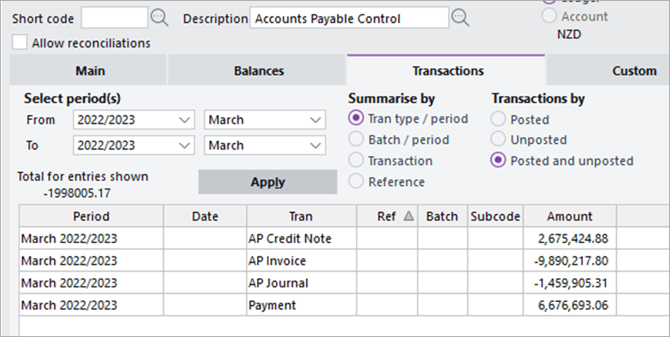
The screenshot below shows the GL account balance.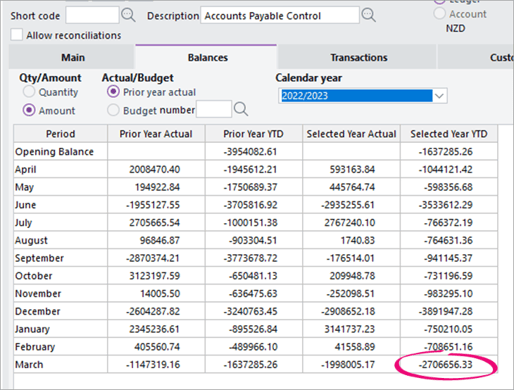
Fixing things that don’t reconcile
| What isn't reconciling | What to do |
| The general ledger account closing balance for the previous period does not agree with the opening balance on audit trail. | Reconcile the previous period again. It is possible that something was inadvertently posted to the general ledger account in the previous period. |
|
The general ledger account movement for the period does not agree with the movement on the audit trail. You can check if they disagree either by subtracting the opening balance from the closing balance, or by calculating the total of the current transactions. |
|
| Journals posted to the debtors control account do not have any corresponding movement in the AR subsidiary ledger or vice versa. |
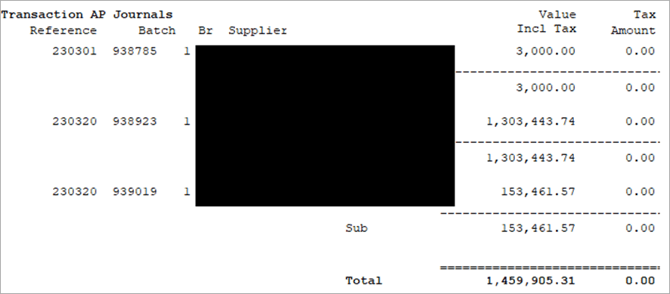
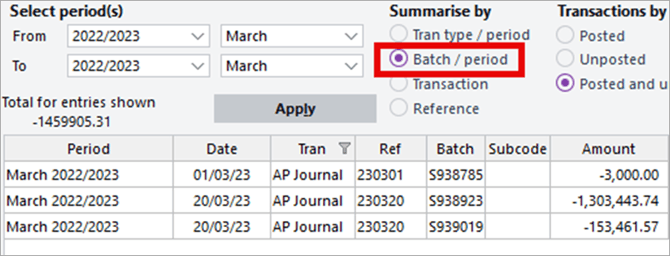
If there are differences for any transaction type, then summarise the transactions by Batch / period. Then compare the total value of the batch in the general ledger with the listing for that batch in the audit trail. Often the issue will be with journals, so be careful when posting them into the sub-ledger. Usually, there is no need to post a journal to the control accounts. E.g. if there was a difference in journals, you could compare the audit trail to the GL summarised by batch/period.
|