
This article covers how to fix issues affecting stock allocation to bins via Bin Replenishment/Put Away.
WBM Put Away is not suggesting the specified picking bin even though there is space.
Where a Bin Replenishment/Put Away is saved but not confirmed the Actual Qty is treated as a future movement. This means that, when a new reference is created, this future movement is included in the available balance calculation.
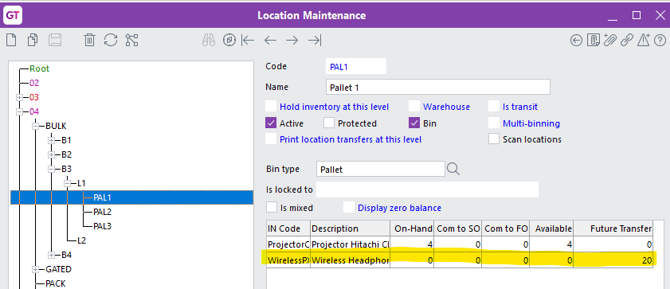
As at 2025.3 via ‘Location Maintenance’ you can now see if there is any unconfirmed ‘Bin Replenishment/Put Away’ in the ‘Future Transfer’ column – as per below:
To resolve this:
- Identify unconfirmed references – Search for any unconfirmed Bin Replenishment/Put Away references for the affected item(s).
- Confirm valid lines and update bins – For lines that should proceed, confirm the applicable lines on the reference and ensure the relevant bins are updated.
- Remove lines or references that should not proceed – Delete any lines on the reference that are not to be confirmed, or, if none of the lines are required, delete the entire reference.
Once these steps are completed, the future movement will no longer be incorrectly included in the calculation for new references.
Put Away option does not put stock in correct bins
Put Away searches for a location where the entire incoming stock can go.
If it cannot allocate the entire incoming stock to the bins allocated on the stock item, it will allocate the stock via the following search:
- Searches from the receipting hierachy and tries to find a bin that can hold the entire incoming stock.
- Searches empty receipting bins against to the stock location.
- Searches all available receipting bins against to the stock location.
Bin is Already Used by Another Inventory Item Error
The reason you are receiving this error is because the Bin was previously set as a Mixed Bin, and when the user turned this setting to false either:
- There was more than 1 stock item in that bin, or
- There was a stock item still unconfirmed on a Bin Replenishment/Put Away reference.
From version 2025.3, you won’t be able to turn off Mixed Bin if either of the following applies to that bin:
- There are multiple stock items in bin with a qtyOnHand or
- There are multiple stock items in bin with a qtyFutureTxf
To resolve this:
- Scenario 1 – Multiple items in the bin:
- Set isMixed back to true for the bin
- Move any stock that should not be in that bin to a different bin.
- Once there is only one stock item remaining in the bin, set Is Mixed to false.
- Scenario 2 – Outstanding Replenishment/Put Away:
- Run Query - Outstanding Replenishment by Bin (you can request this from MYOB Support if needed).
- For those references, either:
-
-
-
Remove the line, or
- Set the Actual Qty to zero, or
- Change the To Bin to another bin.
-
-