Skip to content
  • There are no suggestions because the search field is empty.

2026.1 Release notes

This release adds new features for payroll compliance, emailing options and better usability. We've also resolved issues identified in previous versions.

New features

Payroll compliance

In 2026, there have been payroll legislation changes for both Australia and New Zealand. The 2026.1 release includes new features to help you comply with these changes.


(AU) Updated protected earnings

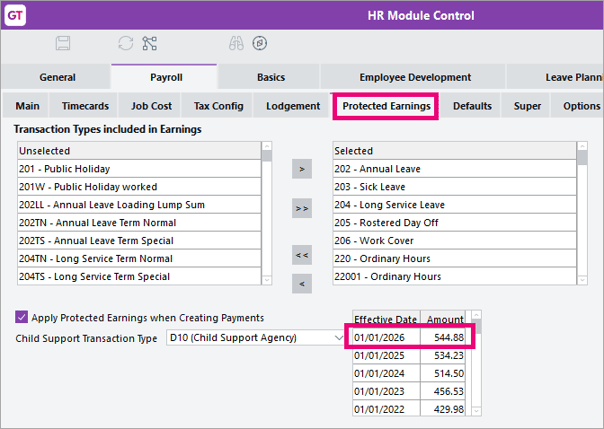
On the Payroll Protected Earnings tab of HR Module Control, we've added a new protected earnings line with an effective date of 01/01/2026 and an amount of $544.88.GT_2026ProtectedEarningsAU

Sending and receiving emails with Microsoft Graph

Microsoft have announced that they will be retiring Exchange Web Services on 1 October 2026. To ensure you can continue sending and receiving emails, version 2026.1 adds support for Microsoft Graph.

Although we have not removed Microsoft Exchange, we recommend preparing well before 1 October to avoid any disruption. To prepare, a system administrator must select Microsoft Graph and authenticate with Microsoft OAuth for the following features:

  • General System Preferences > Email for sending email
  • Company Maintenance > Emailing Preferences for sending email, if enabled at company level.
  • CRM Inbound Email filing for retrieving email.
  • EDI export profiles where the destination is email.
  • EDI import profiles where the source is email.
  • eDocs import from email.

For authentication instructions, see Refreshing email credentials.

As part of adding Microsoft Graph support, we've also replaced some Exchange settings with Graph settings:

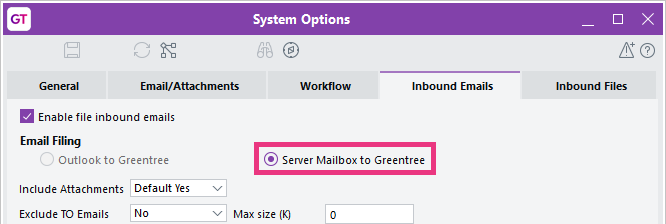
  • On CRM > System Options > Inbound Emails tab, we've renamed Exchange File to Greentree to Server Mailbox to Greentree.GT_MicrosoftGraph4
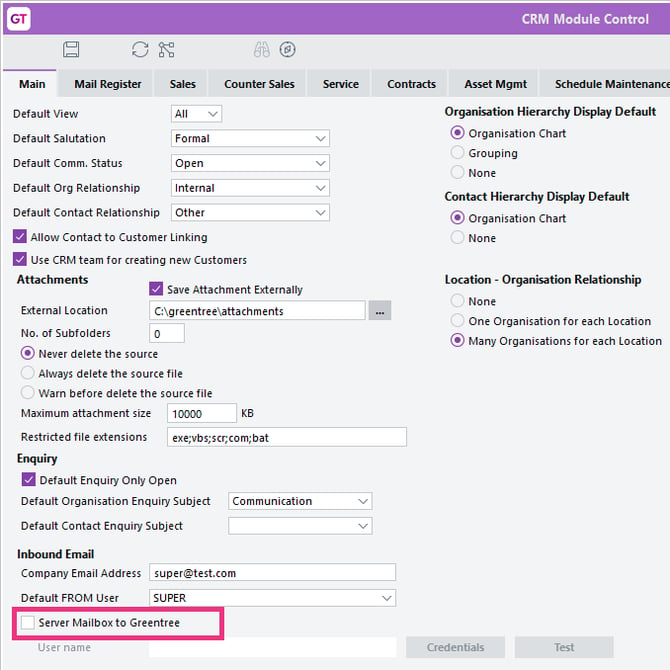
  • On CRM Module Control, we've replaced Exchange Account settings with a checkbox called Server Mailbox to Greentree.GT_MicrosoftGraph5


Simpler Google OAuth setup for email

You can now select Google OAuth as an email authentication method without having to annotate the jadegt.ini file.


Easily view employee's leave requests

We've added two new ways for you to easily see all of an employee's leave requests – past, future, approved, declined, or awaiting approval:

  • You can now select specific employees on View Leave Requests by using the new Employee filters.
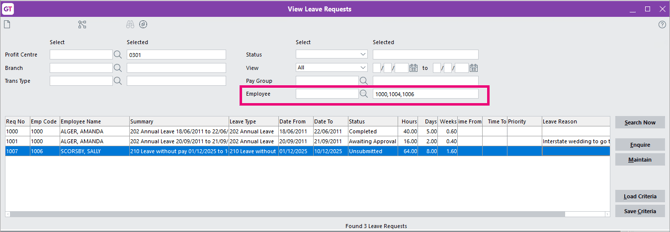
    GT_ViewEmployeeLeaveRequests
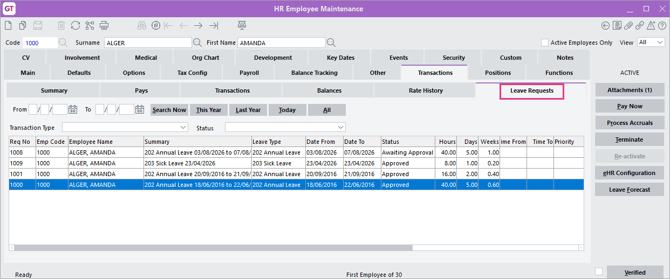
  • A Leave Requests sub-tab on the Transactions tab of HR Employee Maintenance.GT_LeaveRequestsTabHRMaintenance

Copying payroll transaction types

To save time when creating a new transaction type (pay, deduction, tax or employer cost), you can now copy an existing transaction type by clicking the Copy icon on the Transaction Type form toolbar.
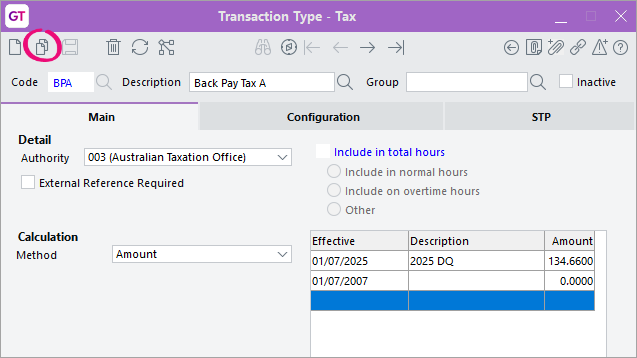
GT_CopyTransactionType

After clicking Copy, you can choose whether or not you want to copy the effective date settings to the new transaction type.
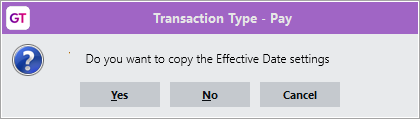
GT_CopyEffectiveDate


Longer job cost activity codes

You can now enter and see longer job cost activity codes (up to 12 characters) on more Greentree windows, including CRM quotes, requisitions, purchase orders, pay entry, and related eDoc and inventory screens.


Better security for WebView and Webstore

When entering a password for WebView salespeople and Webstore web users, the password is now hidden. To make sure you don't make a mistake when entering the password, we've also added a Confirm Password field.

Also, if a WebView supplier has been made inactive, they can no longer log in.


Resolved issues

Greentree Desktop

Issue IDs Description
14528 If a site has WebView and Advanced Password Management enabled, creating a new salesperson could cause an error, e.g. "Password must be at least 10 characters." This could occur even if the salesperson didn't require Webview access.  This has been resolved. Now, password rules are only enforced when WebView access is enabled for the salesperson.
N/A

When queuing jobs to generate PDFs to a local directory, the jobs could fail with “Cannot create PDF file”.

This has been resolved. PDF generation for saved-file jobs now runs on the application server and copies the file to the local machine.

242696261064

When previewing the HR Authority Export Report without entering an Export to File path, you would get a “Exported to file successfully” message even though no file was created.

This has been resolved. Now, you don't get the message if you don't enter a file path.

14532

The JC Summary Totals system script was incorrectly updating job receipt totals when a JC AR invoice on the parent job included sub jobs. This could cause receipts to be recalculated incorrectly. This has been resolved.

N/A

Previously, an eModules user could access features and screens without changing their password after logging in for the first time. This has been resolved. As part of the fix, we've also added a Cancel button that takes the user back to the login screen.

This applies to eCRM, eApprovals, eHR, eRequisitions and eTimesheets.

N/A When setting a transaction type's calculation method to Scale, the Scale Details button could be missing. This has been resolved.
8548 In Webview Form Designer, selecting or moving multiple fields could cause all selected fields to inherit the column width and WebView tab settings (such as Enable Drilldown) of the last field selected, leading to unexpected layout changes. This has been resolved.
14432 Scheduling daily or weekly job streams could fail with an error: "An error has occurred (1086) Class of object is invalid in this context." This has been resolved. 
14417

In HR Payroll, if a pay was edited before payment, leave requests  in that pay could change back to Being Processed and keep that status even after payment. This has been resolved.

N/A Running Query Designer/View Builder views based on the USUserSession class could fail with errors. This also prevented related panels or desktops from loading. This has been resolved.
00014403 On the Depreciation tab of the FA Asset Master Maintenance form, double-clicking the Code field let you change the fixed asset's depreciation code. This has been resolved. Now, you get a message that lets you know the code cannot be changed.
00014331 When a purchase order is invoiced, the related job’s purchase order totals are not being updated correctly. This occurs with job cost lines that have a quantity more than one. 

This has been resolved so that the issue won't occur for new purchase orders. This fix does not recalculate existing purchase orders that were already affected by the issue.

00014324 WebView online enquiries were being exported as XML files, even if the system preference was set to export them as XLSX files. This has been resolved.
N/A When applying some Greentree packages with package optimisation turned on, packman.exe could crash, preventing the package from being applied. This has been resolved.
N/A

In Query Designer, using a query collection with multiple filters could clear the selection filter criteria and cause an error: "An error has occurred (4) Object not found." Closing and reopening the form could cause another error: "Incorrect use of Query Designer agent fetcher. Asked for a single agent when multiple of that type exist."

This has been resolved.

N/A

In the Approvals panel on workflow desktops where approvals are shown in a table, an error could occur: "An error has occurred (4) Object not found." This has been resolved.

11504 When copying a closed CRM quote with only one line item, the line item wasn't being copied if the organisation relationship was set to CustomerCustomer & Supplier or Reseller & Customer. This has been resolved.
00014519 / 202386259446 When running the Timesheet Summary report (that uses ODBC) it could fail with an internal JADE ODBC error.
14507 / 202386259436

When hotprinting an AR receipt, the hotprint recipient defaulted to the main customer email address. This has been resolved.

Now, the To email address now defaults to the Receipt Recipient on the Defaults tab of the Customer Maintenance form. The main customer email address is only used if no Receipt Recipient has been set.

248628473296 / 253264837053

For New Zealand companies, the Pay Slip and Pay Summary reports were showing blank values instead of zero for some reporting methods. This has been resolved.

233620043242

PO receipts were sometimes not being created for some shipments with serial/lot tracking.

235108011468

On the Select CRM Report Form, the Delete button did not work when trying to delete saved selections. This has been resolved.

232920696303

When the job stream had invalid task references, then task queue errors were written to the log file, causing the log file to become very large. This has been resolved.

220539388355

The Windows Designer Administration form has been updated so the Tree Assignment form (and other excluded forms) no longer appear as available for customisation. This resolves the error, "An error has occurred (1090) Attempted access via null object reference."

00014551 Importing an AR Standing invoice via FREE did not import header narration. This has been resolved.
14415 When running the HR Authority Remittance Export report for an Australian company, you could get an error: "An error has occurred (1035) String too long." This happened because the maximum length for one of the report fields was not long enough for an ABN. This has been resolved. 
14379 If multiple users tried cancelling a pay run at the same time, it could be only partly cancelled. This has been resolved. Now, only one user can cancel a pay run at a time.
N/A On the Sales tab of the AR Module Control form, clicking Recreate history could cause an error: "An error has occurred (14079) The text size exceeds maxLength." This has been resolved.
00014265 Very large balances on the View General Ledger form could cause an error: "An error has occurred (4033) Result of expression overflows Decimal precision." This has been resolved.
237813504503 When using Inspector or View Designer, the CRMQuoteJCEstimateLine view incorrectly displayed myCRMQuote twice, causing confusion and incorrect data to be returned. This has been resolved.

eDocs

Issue IDs Description
249665482203 When matching eDocs AP invoices to purchase order or purchase order receipt lines, the sell rate wouldn't update if the unit cost on the supplier invoice was changed. This has been resolved.
202386260447 eDocs transaction forms sometimes failed to display PDFs. Although you could see the form, the document display panel was blank.
00014563 / 205875437004 When processing eDocs AP Invoices for BPAY suppliers and clicking the Next icon to move to the next document, the BPAY reference could carry over from the previous eDoc instead of being blank. This has been resolved.
14500 / 202386259423

When changing an eDoc type and company, you could get an error: "eInvoicing not supported for transactions of class 'EDocAPStatement'." This has been resolved.

Now, the only eDoc type you can't change is an eInvoice received from Peppol, as intended.

N/A When adding a new server/file path line on eDocs Module Control, clicking the Change button before saving incorrectly opened the file mask setup for above line, instead of the new line. This has been resolved.
14226 When an eDoc AP invoice was automatically matched to a purchase order during scraping, the line value and matched value did not update until you manually deselected and reselected the lines. This has been resolved.
N/A Uploading large attachments via eModules could be slow and sometimes time out, especially for files around 20 MB. We've optimised attachment handling so large files now upload faster and more reliably, including when multiple users upload large files at the same time.
252040257995 When using the Auto Match table to match an eDocs AP invoice to a purchase order, the sell rate was not updating. This has been resolved.

eModules

Issue IDs Description
00014276

Uploading an attachment that was too large could cause an error ("The page cannot be displayed because an internal server error has occurred"), but the attachment still uploaded. If you downloaded the attachment, it downloaded as a zero byte file.

This has been resolved. Now, you get clearer error messages when a file is too large.