
Date: 8/8/2025
Status: Fixed in 2025.2.200
Reference - CE00061503 / ADV-71960
Issue
In the Report Designer, when user tried to open a report that was downloaded from Acumatica ERP by using the Edit Report button on the toolbar of the report's form, the "Authentication failed. The user with the given login and password was not found in the system." error occurred.
Workaround
Check the Server URL in Report Designer
Specify the https:// or http:// prefix based on your server certificate specifics before the URL of the server in the Open report from server dialog box of the Report Designer as shown in the screenshot below.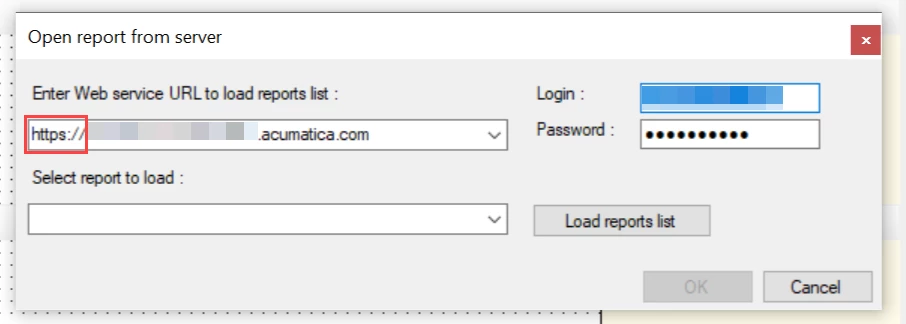
If issue still persists:
1. Check the User Settings
Go to Users (SM201010) screen and locate the affected user. Is the Forbid Login with Password is selected?If selected, you'll need to update the setting:
- Unlicense the partner user.
- Uncheck Forbid Login with Password and save.
- Re-assign the partner license.
- Retry accessing the report.
2. Confirm the Report Designer Version
-
If using an older version of Report Designer after upgrading to 2024 R2 (or later), you may encounter a different error such as:
"Error during login: Client found response content type of ', but expected 'text/xml'. The request failed with an empty response."
In this case, install the correct version of Report Designer that matches your MYOB Acumatica site version.
-
If issues continue after the above checks:
-
Confirm which version of Report Designer is being used.
-
How to check the version:
-
Navigate to where Report Designer is installed on the computer.
-
Locate the ReportDesigner application.
-
Right-click and select Properties.
-
Go to the Details tab.
-
Check the Product version field.
-
-
-
If the version is lower than 24.205.0015, download and install the latest Report Designer from the MYOB Acumatica site.
-
If the version is 24.205.0015 or higher, but the issue persists, please raise a case with Support so this can be investigated further
-