
AI Assistant uses AI units to measure consumption.
Your site gets a monthly allocation of AI units, shared across all users and tenants. 500 AI units is enough for roughly ten to fifteen queries, depending on their complexity.
If you run out of units, AI Assistant pauses until the next month starts or you add more units.
Checking your AI unit usage
You can check your usage, limit and availability of AI units from the System Managament screen.
- Go to System Management and open the Licence Maintenance tab.
- Open the Entitlements tab.
- Find the AI Units entry in the table.
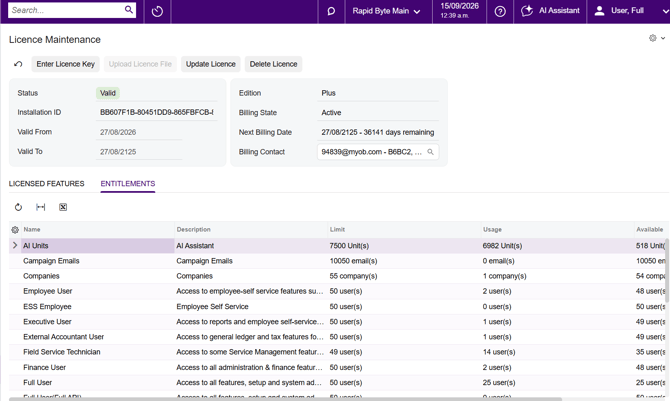
- Review the columns to check your usage:
- Limit: the site’s licensed AI Unit capacity for the current period.
- Usage: the AI Units used so far in the current period.
- Available: the AI Units remaining.
When you reach the limit you will get a warning message and users will not be able to send any more requests to AI Assistant.
Getting more AI units
Units are available in 500-unit blocks.
To add more units, contact your MYOB Acumatica partner (or MYOBs customer success team if you are a direct customer).