
Intelligent text completion saves you time and effort filling in information that is often repeated, including suggestions for common phrases. The model is updated weekly, so that it adjusts to your company's terminology and tone.
Before you start, make sure you've turned on MYOB Acumatica's AI features.
Once you've switched intelligent text completion on at the system level, it is turned on for all users by default. Each user can enable or disable it in their own user profile if required.
Using intelligent text completion
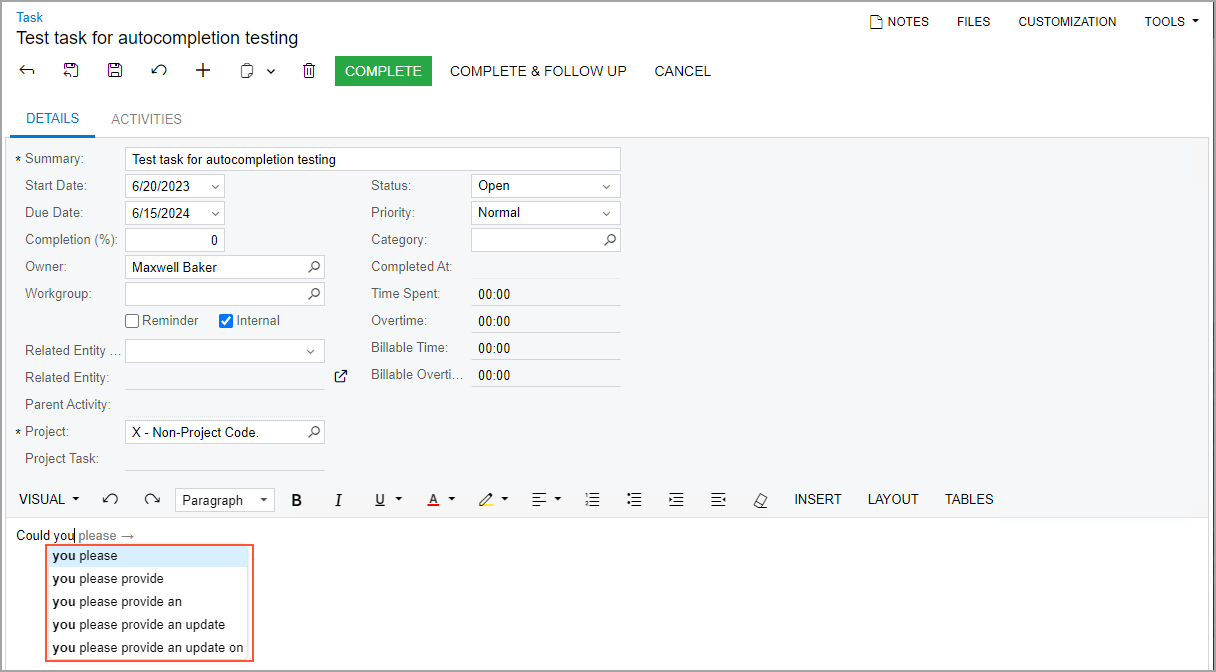
Intelligent text completion works in much the same way as autocomplete on your phone. As you type into text fields, a list of suggestions appears for you to choose from.
- Use the Up and Down arrow keys to highlight a phrase.
- Use the Right arrow key to select a phrase and enter it into the text field.
Turning on or off intelligent text completion in your user profile
- Click your username at the top-right of the screen, and click My Profile.

The User Profile screen opens. - In the General Info tab, select or clear the Intelligent Text Completion checkbox.

- Click Save once you're done.
More information
For more information on using intelligent text completion, see the Text Area page in our online user interface guide.
If you want to dive deeper into the models behind intelligent text completion, see Generate Models for Text Completion.