
If leave taken or deduction lines appear twice on Pay Activity Detail (MPPP6027) or Pay Run Details (MPPP6021), it usually means a liability GL purpose has been linked to a liability group in the posting class.
The fix on this page ensures that future pay runs will no longer duplicate. It's useful if you only have a few affected pays that are still open.
If lots of historical pays are affected
You can contact our support team for a script to fix the historical pays in bulk. Make sure to mention this service problem: CE00035599.
Fixing the issue
1. Update the GL purpose
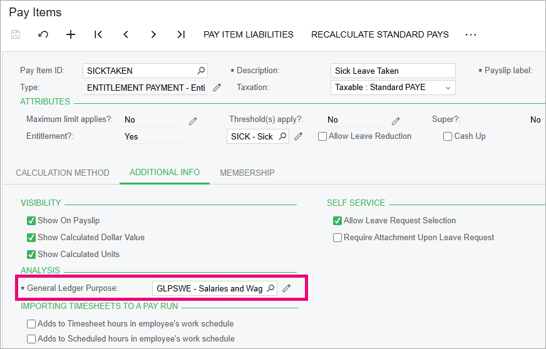
- Go to the Pay Items form (MPPP2210) and open the affected pay item.
- On the Additional Info, note what the General Ledger Purpose is.
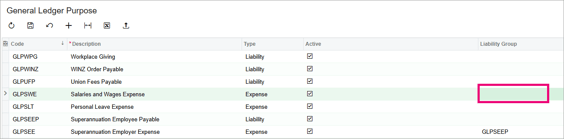
- Go to the General Ledger Purpose form (MPPP1020).
- In the row for the GL purpose you noted, remove the Liability Group.
-
Save your changes.
2. Refresh affected pays
- Go to the Pay Details form (MPPP4110) and select the affected pay run.
- From the Pay Run Details form, select an employee to open the Employee's Current Pay (MPPP33120).
- In the table, select the affected pay item and click the Delete Row icon
 .
. -
Click the Add Row icon
 and re-add the pay item you deleted in step 3.
 -
Recalculate and complete the pay.