
There are two main causes for this error on the Pay Run Details form:
-
If an employee's defintion of week (DOW) does not have a start date.
-
If a new employee has an incorrect date entered outside of payroll dates.
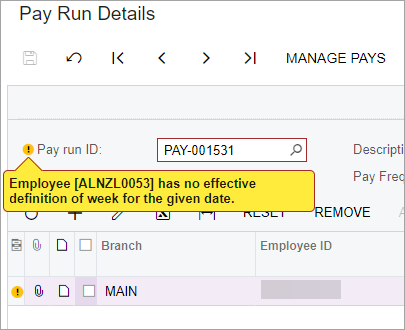
Fixing the error
- Go to the Pay Details form (MPPP2310).
- In the Employee ID field, select the employee with the error.
- On the Definition of Week tab, make sure their DOW has a start date. This is the most common cause of the error.
- Save your changes.
- Go to the Manage Pays form.
- Click the pay run with the error to open the Pay Run Details form.
- Remove the employee from the pay run, then re-add them.
- On the form toolbar, click the three dots icon (...) and choose Recalculate. Ensure the pay run status no longer shows with as ERROR.
- Process and complete the pay run.