
To apply for MYOB's Pay Super service you need to send us your serial number and CDFID. This information can be tricky to find — follow these steps to make sure your application is processed as quickly as possible.
This process takes you to an error screen to get the info you need. Don't panic! We're working to make this information more accessible, but in the meantime this is the easiest way to get it.
- Sign into MYOB Acumatica. Make sure you are on your production tenant (not one you use for testing or training).
- Go to the Payroll Preferences screen (MPPP1100).
- Open the Pay Superannuation tab.
- Select the MYOB PaySuper service option.
- Click Register.
An error screen appears, with the message "We're sorry but something went wrong." - Copy the URL from the error screen.
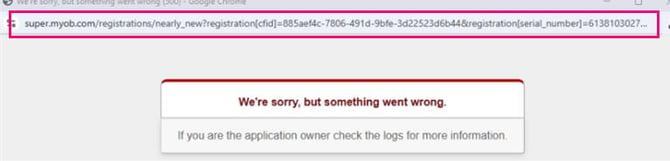
- Make sure you copy the entire URL — it's longer than the address bar.
- Paste it into notepad or an email so you can find it easily.
Once you have that URL, you're ready to apply for a Pay Super account. To continue the process, see Get started with MYOB's Pay Super service.