
AI Assistant lets you explore your company data in plain language, without building a report or waiting for an expert.
When you ask AI assistant a question, an AI agent looks across your generic inquiries (GIs) and returns an answer. It's like Chat GPT or Claude, but with safe, secure and configurable, access to your company information in real time.
Before you start, make sure you've got access to AI Assistant. It's available starting with version 2026.1.201, see How do I get AI Assistant? for more info.
AI Assistant use is measured in AI units. Most MYOB Acumatica subscriptions include a base entitlement and more can be purchased. For more info, see Managing your AI Assistant usage.
Asking AI Assistant a question
AI Assistant is preconfigured with MYOBs own LLM configuration and access to a range of your company data, so you can start asking questions straight away.
To ask a question, just click the AI Assistant icon in the top pane and type your question. It can reply in a variety of formats, including tables of data and plain language answers.
A good first question is "Which customers are over their credit limit?". The answer
Here are some other example questions that can be answered by the default configuration:
- "What sales did we make in the last 12 months by salesperson?"
- "Which marketing campaigns are still open?"
- "What is each employee's leave balance as at today?"
Once you have your answer from AI Assistant you can drill down into records, turn the info into dashboards and pivots and group related questions together. For more information, see Working with AI Assistant: General Information.
What data does AI Assistant use?
AI Assistant uses information from GIs to answer questions about your business data. GIs are "exposed" to AI Assistant to make their information available. Many are exposed by default, and you can also choose which GIs are exposed (or not).
For a list of the GIs available by default, see AI Assistant: Default data access.
Adding more data to AI Assistant
By default, AI Assistant does not have access to data about journal entries in your general ledger, so it can't answer a question like "Which manual journal entries were posted last month?".
To configure AI Assistant to answer this question you need to do three things:
- Give AI Assistant access to the GIs with the right data (GL-ML-Journal Entries Analysis (GL3010ML).
- Add a prompt to the GI to give AI Assistant an understanding of what the data means and how to use it.
- Refresh AI Assistant with the new GI information.
Here's the steps for this example:
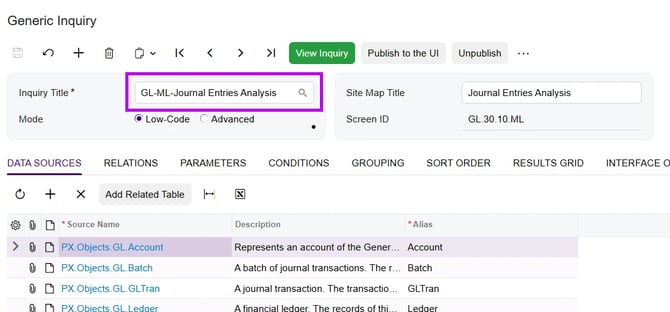
- Go to Generic Inquiry (SM208000) and select GL-ML-Journal Entries Analysis.
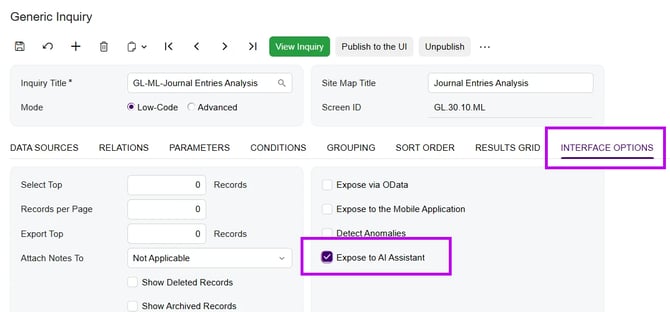
- Go to the Interface Options tab, and select Expose to AI Assistant.
- Go to the AI Description tab, and copy and paste the following prompt into the field:
Shows journal entries posted to the general ledger, including manual journal entries, with their [date, period, account, project and amount] columns. Use it for any question about journal entries, such as which manual journal entries were posted in a period. It does not show [budgets or account balances].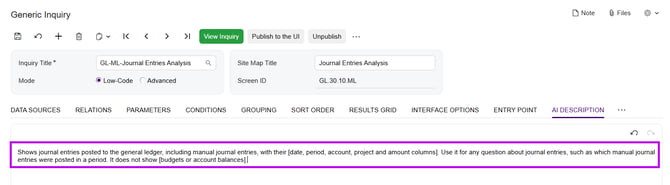
- Save the updated GI record.
You've made the GI available to AI Assistant, and added a prompt to tell it what it means. Next you need to refresh AI Assistant's data. - Go to AI Assistant Data Processing (ML503010).
The GI you edited shows the status Required for update. - Click Process All.
The status updates to Update completed.
You're ready to ask AI Assistant about journals. Open the AI Assistant panel and ask "Which manual journal entries were posted last month?".
For more information on exposing GIs, including how to add more detailed descriptions to individual GI fields, see Exposing Generic Inquiries to AI Assistant: General Information.