
Editions
MYOB Acumatica can be licensed with a general edition or a industry-specific edition:
- General: Standard, Plus and Enterprise.
- Industry-specific: Manufacturing and Construction.
The edition determines the licensed entitlements as well as which user licence types are available.
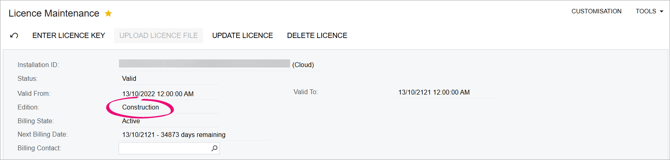
The site’s edition is shown on the Licence Maintenance form (SM201510).
User licence types
Users are assigned one or more licence types, which determine their level of access to the system. MYOB Acumatica operates on a named user basis, so each user of the MYOB Acumatica must be assigned at least one licence type to be able to log in. A site’s licence specifies the maximum number of users of each licence type.
The Licence Usage report (SM651001) in the Configuration > User Security section shows how many of each licence type has been assigned and the users each type has been assigned to.
Licence types are assigned to users on the Licences Types tab of the Users form (see License types tab).
| User licence type | Editions | Description |
| Full user | All | Access to all features, and all setup and system administration tasks. |
|
Employee |
All |
Access to employee self-service features such as tasks, timesheets and expenses. |
|
Executive |
All |
Read-only access to all features and edit access for key tasks. |
|
Payroll Admin |
All |
Although the Payroll Admin user is included in our price lists, it's not enforced in MYOB Acumatica. Instead, users that require access to payroll administrator features can be assigned the People Payroll User role the Users form (SM201010). |
| Sales & CRM | Plus Enterprise Manufacturing Construction |
Access to all CRM-related features such as opportunities, sales orders, case management and marketing. |
| Warehouse | Plus Enterprise Manufacturing Construction |
Access to all warehouse related features such as inventory, purchasing, sales order shipping and stocktake. |
| Project | Plus Enterprise Manufacturing Construction |
Access to the Projects module and all project management features. |
| Field Service Manager | Plus Enterprise Manufacturing Construction |
Access to features for managing a services team. |
| Field Service Technician | Plus Enterprise Manufacturing Construction |
Access to features for executing service work. |
| Manufacturing | Manufacturing Construction |
Access to features for carrying out manufacturing operations. |
| Finance | Enterprise Manufacturing Construction |
Access to all administration and finance features such as Accounts Payable, Accounts Receivable, General Ledger and Cash Management. |
| Velixo Reporting User | All | Access to Velixo Reporting and writeback feature. |
| Quality Management for Distribution | Plus Enterprise |
Access to QC testing at purchase receipt or shipping (in addition to Warehouse or Manufacturing). |
| Quality Management for Manufacturing | Manufacturing Construction |
Access to QC testing at purchase receipt, shipping and in-production (in addition to Warehouse or Manufacturing). |
| Quality Management for QA Inspections & Checklists | Plus Enterprise Manufacturing Construction |
Access to detailed inspections and checklists features (in addition to Warehouse or Manufacturing). |
| Quality Management for NC and CAPA | Plus Enterprise Manufacturing |
Access to non-conformance and corrective and preventative actions feature (in addition to Warehouse or Manufacturing). |
| External bookkeeper | Enterprise | Access to back-office accounting features such as General Ledger, cashbook, tax and financial reports. |
| Full User (API) | - | See our page about API licences. |
Access to features is controlled by their licence type and role
A feature is only available to a user if both their licence type and role allow it. In most cases, a user’s licence gives access to more features than their role, and you can use roles to limit which of those licence features the user can actually use.
Unlike licence types, users can define their own roles on the User Roles form (SM201005). Administrators can assign roles to users on the Roles tab of the Users form (SM201010).
For sites with multiple companies
If a a site has multiple companies, and user records with the same username exist across multiple companies, then MYOB Acumatica treats them as a single user for the purpose of licensing.
For example:
- A user with the username Adam exists in the companies Company1 and Company2.
- The Adam in Company1 is assigned the user types “Employee User” and “Sales User”.
-
The Adam in Company 2 is assigned the user type “Sales User” only.
This will uses one “Employee User” licence and only one “Sales User” licence, as the Adam users in both companies are treated as the same user, and are counted only once for licensing.
Entitlements
Entitlements refers to the quantity of certain of certain features that you have access to. A site’s edition specifies the number of each licence type that can be assigned to users. In addition to licence type limits, the following entitlements are enforced:
- Campaign Emails – the number of campaign emails that can be sent per month.
- Companies – the number of individual companies that can be set up in the system.
- Customer Portal Access – the number of users who can be given to the MYOB Acumatica Customer Portal.
-
Storage Space – the amount of storage space allocated for company databases and documents.
Licence type limits and usage are displayed on the Entitlements tab of the Licence Maintenance form. The amount of each entitlement depends on the edition of MYOB Acumatica that is licensed.